Check Your Payslip
Upload a payslip and WeFixPay will help identify your pay, deductions and possible discrepancies.
Privacy first: Your payslip will be processed temporarily and will not be saved to the WordPress Media Library or stored permanently on WeFixPay.
Important: WeFixPay highlights possible differences for you to review. Results should always be checked against your payslip, employment contract and employer information.
Payslip Checker UK: Use the free WeFixPay Payslip Checker to review your pay, Income Tax, National Insurance, pension and other deductions. Upload your payslip and WeFixPay will help identify the figures shown, compare selected deductions with independent estimates and highlight possible differences that may need checking.
How the Payslip Checker Works
The WeFixPay Payslip Checker helps UK workers understand the figures shown on their payslip. Upload a PDF, JPG or PNG payslip and the checker identifies key information such as gross pay, net pay, Income Tax, National Insurance, pension deductions and other amounts shown. Where enough information is available, WeFixPay can compare selected deductions with independently calculated estimates and highlight possible differences for you to review. If important information such as Income Tax paid year to date cannot be identified, you may be asked to enter it manually so the tax check can be completed. Your payslip is processed temporarily and is not permanently stored by WeFixPay.
What Does the Payslip Checker Check?
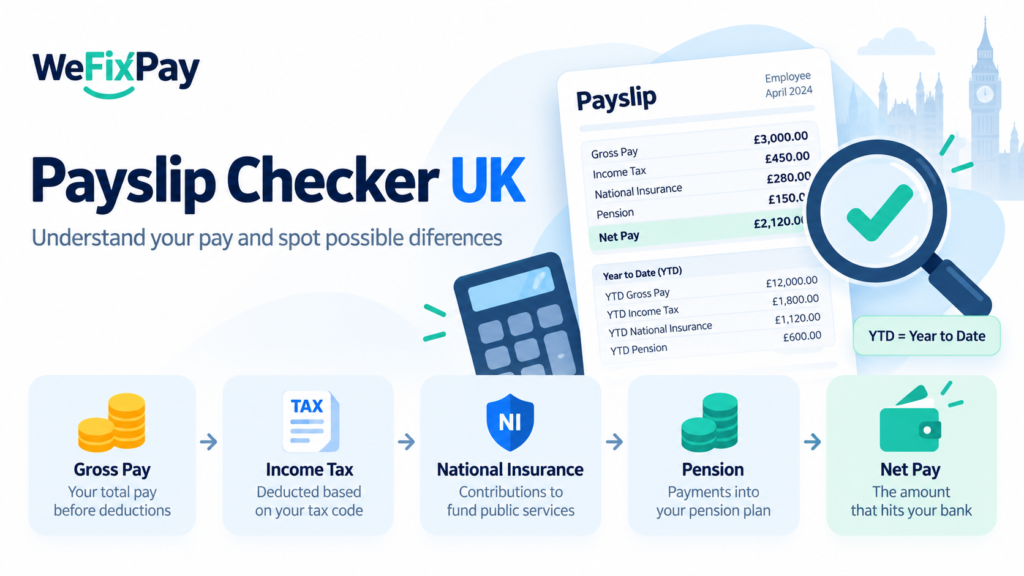
The WeFixPay Payslip Checker reviews the main pay and deduction figures shown on your payslip and presents them in a simpler summary. Depending on the information available, it can identify and review:
You can also compare individual deductions using our UK Tax Calculator, National Insurance Calculator and Pension Calculator.
- Gross pay – your earnings before deductions.
- Net pay – the amount left after deductions.
- Income Tax (PAYE) – the tax deducted from your pay.
- National Insurance – your employee National Insurance deduction.
- Pension contributions – pension deductions shown on the payslip.
- Student loan deductions – where these appear on the payslip.
- Overtime and enhancements – additional earnings that are clearly shown.
- Tax code, pay frequency and tax period – information used when checking selected deductions.
The checker also performs a basic arithmetic check to see whether gross pay minus the deductions shown matches the net pay on the payslip. Where enough payroll information is available, WeFixPay can independently estimate selected Income Tax and National Insurance amounts and highlight possible differences for further review.
Common Payslip Problems to Check
Payslips can contain errors or unexpected deductions, so it is useful to review them regularly. Some things worth checking include:
- Incorrect tax code – an unexpected tax code can affect how much PAYE is deducted.
- Missing overtime or enhancements – check that additional hours, weekend payments or other enhancements you expected are shown.
- Unexpected National Insurance deductions – compare the NI shown with the earnings and NI category on your payslip.
- Incorrect pension deductions – check that the amount deducted matches what you expect from your workplace pension arrangement.
- Student loan deductions – make sure deductions only appear when they apply to you.
- Gross pay and net pay differences – check that the deductions shown explain the difference between gross and take-home pay.
- Year-to-date figures – YTD means “Year to Date” and shows totals accumulated during the tax year, such as Income Tax paid so far.
A difference does not automatically mean your employer has made a mistake. Payroll adjustments, tax-code changes, previous-period corrections and other circumstances can affect the figures. WeFixPay highlights possible differences so you know what may be worth checking with your payslip, employer or payroll department.
For official guidance on what information should appear on a payslip, see the GOV.UK guidance on payslips and employee rights
Payslip Checker FAQs
Is the WeFixPay Payslip Checker free?
Yes. You can currently check up to three payslips within 24 hours. The checker is designed to help you understand your pay and identify figures or possible differences that may be worth reviewing.
Is my payslip stored by WeFixPay?
No. Uploaded payslips are processed temporarily so the checker can extract the required information. WeFixPay does not permanently store your uploaded payslip in the WordPress Media Library.
What does YTD mean on a payslip?
YTD means Year to Date. It shows the total accumulated from the beginning of the tax year up to the current payslip. For example, Income Tax YTD shows how much PAYE Income Tax has been deducted so far during the tax year.
What should I do if WeFixPay finds a difference?
A highlighted difference does not necessarily mean your payslip is wrong. Check the figures against your payslip, employment information and any recent payroll adjustments. If something still looks incorrect, you may wish to ask your employer or payroll department to explain the calculation.